> ## Documentation Index
> Fetch the complete documentation index at: https://langchain-5e9cc07a-preview-opensw-1783454697-4d4e2b4.mintlify.site/llms.txt
> Use this file to discover all available pages before exploring further.
# Overview
> Control and customize agent execution at every step
Middleware provides a way to more tightly control what happens inside the agent. Middleware is useful for the following:
* Tracking agent behavior with logging, analytics, and debugging.
* Transforming prompts, [tool selection](/oss/javascript/langchain/middleware/built-in#llm-tool-selector), and output formatting.
* Adding [retries](/oss/javascript/langchain/middleware/built-in#tool-retry), [fallbacks](/oss/javascript/langchain/middleware/built-in#model-fallback), and early termination logic.
* Applying [rate limits](/oss/javascript/langchain/middleware/built-in#model-call-limit), guardrails, and [PII detection](/oss/javascript/langchain/middleware/built-in#pii-detection).
Add middleware by passing them to `createAgent`:
```typescript theme={null}
import {
createAgent,
summarizationMiddleware,
humanInTheLoopMiddleware,
} from "langchain";
const agent = createAgent({
model: "gpt-5.5",
tools: [...],
middleware: [summarizationMiddleware, humanInTheLoopMiddleware],
});
```
## The agent loop
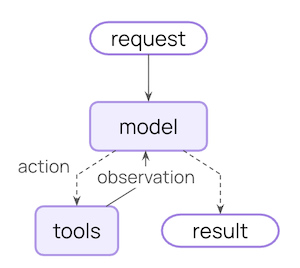
The core agent loop involves calling a model, letting it choose tools to execute, and then finishing when it calls no more tools:
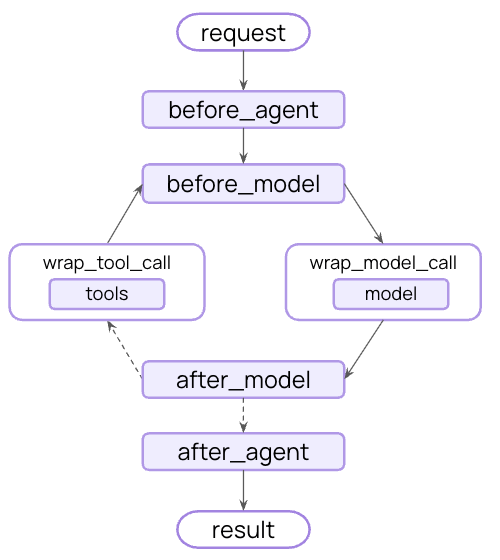
 Middleware exposes hooks before and after each of those steps:
 ## Use middleware inside a LangGraph workflow
Middleware is not a separate runtime: hooks run inside the compiled [LangGraph](/oss/javascript/langgraph/overview) that [`create_agent`](https://reference.langchain.com/javascript/langchain/index/createAgent) returns. You can drop the whole agent (middleware and all) into a larger [StateGraph](https://reference.langchain.com/javascript/langchain-langgraph/index/StateGraph) as a node or subgraph, and every middleware hook continues to run.
Reach for this pattern when the surrounding topology is more than a standard "loop until done": classifying input before routing to one of several agents, fanning out work in parallel, or stitching agent calls together with deterministic steps.
`HumanInTheLoopMiddleware` matches against each tool's `.name`. In Python, `@tool`-decorated functions take their name from the function (so the key below is `"send_email"`); in TypeScript, the key matches the `name` you pass to `tool({...}, { name })`.
```typescript theme={null}
import { AgentState, createAgent, humanInTheLoopMiddleware } from "langchain";
import { StateGraph, START } from "@langchain/langgraph";
// Assumes readEmail, sendEmail, classifyNode, and route are defined elsewhere.
// readEmail / sendEmail are registered with name: "read_email" / "send_email".
const emailAgent = createAgent({
model: "claude-sonnet-4-6",
tools: [readEmail, sendEmail],
middleware: [humanInTheLoopMiddleware({ interruptOn: { send_email: true } })],
});
const graph = new StateGraph(AgentState)
.addNode("classify", classifyNode)
.addNode("emailAgent", emailAgent)
.addEdge(START, "classify")
.addConditionalEdges("classify", route)
.compile();
```
The HITL interrupt, summarization, PII redaction, retries, and any custom hooks all travel with the agent node. See [Use subgraphs](/oss/javascript/langgraph/use-subgraphs) for the full set of composition patterns, including subgraph checkpointer scoping (per-invocation versus per-thread).
## Additional resources
Explore built-in middleware for common use cases.
Build your own middleware with hooks and decorators.
Complete API reference for middleware.
Provider-specific middleware for Anthropic, AWS, OpenAI, and more.
Test your agents with LangSmith.
***
## Use middleware inside a LangGraph workflow
Middleware is not a separate runtime: hooks run inside the compiled [LangGraph](/oss/javascript/langgraph/overview) that [`create_agent`](https://reference.langchain.com/javascript/langchain/index/createAgent) returns. You can drop the whole agent (middleware and all) into a larger [StateGraph](https://reference.langchain.com/javascript/langchain-langgraph/index/StateGraph) as a node or subgraph, and every middleware hook continues to run.
Reach for this pattern when the surrounding topology is more than a standard "loop until done": classifying input before routing to one of several agents, fanning out work in parallel, or stitching agent calls together with deterministic steps.
`HumanInTheLoopMiddleware` matches against each tool's `.name`. In Python, `@tool`-decorated functions take their name from the function (so the key below is `"send_email"`); in TypeScript, the key matches the `name` you pass to `tool({...}, { name })`.
```typescript theme={null}
import { AgentState, createAgent, humanInTheLoopMiddleware } from "langchain";
import { StateGraph, START } from "@langchain/langgraph";
// Assumes readEmail, sendEmail, classifyNode, and route are defined elsewhere.
// readEmail / sendEmail are registered with name: "read_email" / "send_email".
const emailAgent = createAgent({
model: "claude-sonnet-4-6",
tools: [readEmail, sendEmail],
middleware: [humanInTheLoopMiddleware({ interruptOn: { send_email: true } })],
});
const graph = new StateGraph(AgentState)
.addNode("classify", classifyNode)
.addNode("emailAgent", emailAgent)
.addEdge(START, "classify")
.addConditionalEdges("classify", route)
.compile();
```
The HITL interrupt, summarization, PII redaction, retries, and any custom hooks all travel with the agent node. See [Use subgraphs](/oss/javascript/langgraph/use-subgraphs) for the full set of composition patterns, including subgraph checkpointer scoping (per-invocation versus per-thread).
## Additional resources
Explore built-in middleware for common use cases.
Build your own middleware with hooks and decorators.
Complete API reference for middleware.
Provider-specific middleware for Anthropic, AWS, OpenAI, and more.
Test your agents with LangSmith.
***
[Connect these docs](/use-these-docs) to Claude, VSCode, and more via MCP for real-time answers.
[Edit this page on GitHub](https://github.com/langchain-ai/docs/edit/main/src/oss/langchain/middleware/overview.mdx) or [file an issue](https://github.com/langchain-ai/docs/issues/new/choose).